

Part 3 of 3
A three-span continuous beam driven by one parameter
Use math boxes in ParamEle so a single span value drives a three-span beam, and check it against the 0.4wL, 1.1wL and 0.1wL² coefficients.
Published 4 min read
In the previous parts you built a simply supported beam and a single storey frame. Now you will model a continuous beam over four supports, with three equal spans and a uniform load.
New in this part: math boxes. The support positions are multiples of the span, so a single parameter drives the whole geometry. You will also see how a result box takes several members at once.
The finished model is under File > Samples > Three-span continuous beam.
1. The parameters
| Box | Value |
|---|---|
| Origin (0) | 0 |
| Span of each bay L [m] | 5 |
| Load w [kN/m] | -20 |
| Factor 2 | 2 |
| Factor 3 | 3 |
Star Span of each bay L and Load w.
2. Positions, with math
The supports are at x = 0, L, 2L and 3L. You already have the first two positions (Origin and Span L); for the other two, add two Multiply boxes:
- x = 2 L: Span L in one input and Factor 2 in the other.
- x = 3 L: Span L and Factor 3.
The output of a Multiply box wires like any other number. There are boxes to add, divide, raise to powers, take roots and do trigonometry, and they chain together to write any expression.
3. Nodes, section and members
Add four Node boxes, with y and z from Origin and these x:
| Node | x |
|---|---|
| Node 1 | Origin |
| Node 2 | Span L |
| Node 3 | x = 2 L |
| Node 4 | x = 3 L |
Set up the material as in the previous parts and a 300 × 450 mm Rectangular Section. Then add three Member boxes, one per bay: from node 1 to 2, from 2 to 3 and from 3 to 4, all with the same section.
We use one member per bay because every support has to sit on a node.
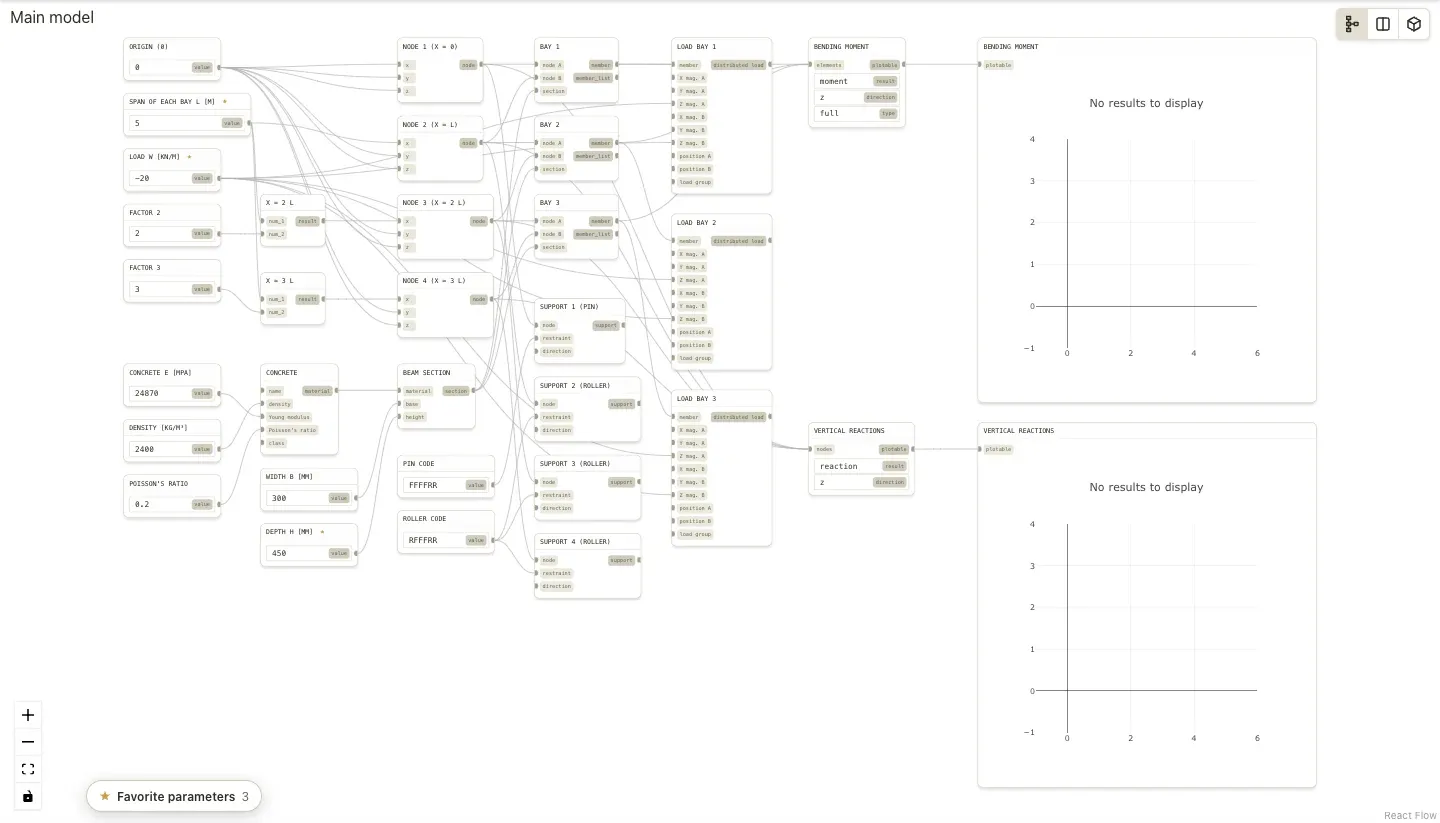
The continuous beam graph.
4. Supports from a single code
As in the first part, use Text boxes with the restraint codes (Tx Ty Tz Rx Ry Rz, F fixed and R released):
- Pin
FFFFRRat node 1. - Roller
RFFFRRat nodes 2, 3 and 4.
One text box is enough for the three rollers: wire it to all three Generic Support boxes. If you ever want a different support type, you change it in one place.
5. The loads
Add three Distributed load boxes, one per member, with Load w in Z mag. A and Z mag. B. All three take the same load box.
6. Results of several members
- An Element Result box with all three bays wired to its
elementsinput,moment, directionzandfull, wired to a 2D Plot. Each bay shows up as its own curve, from 0 to 100 % of that bay. - A Nodal Result box with the four nodes,
reactionand directionz, wired to another 2D Plot.
Solve with Structure > Solve.
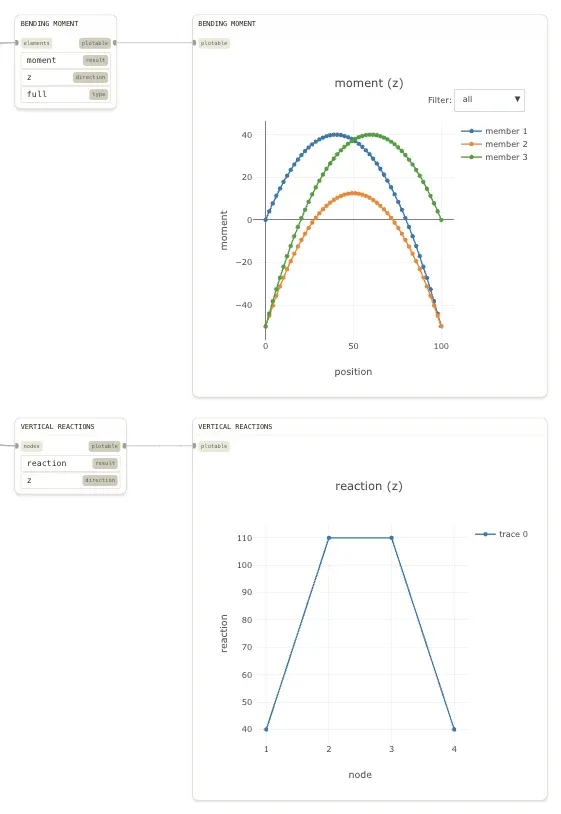
Moment in each bay and vertical reactions at the four supports.
7. Check it against the coefficients
A three-span continuous beam with equal spans and a uniform load has well-known coefficients. With w = 20 kN/m and L = 5 m (wL = 100 kN, wL² = 500 kN·m):
| Result | Coefficient | By hand | ParamEle |
|---|---|---|---|
| Reaction at the end supports | 0.4 wL | 40 kN | 40 kN |
| Reaction at the interior supports | 1.1 wL | 110 kN | 110 kN |
| Moment over the interior supports | −0.1 wL² | −50 kN·m | −50 kN·m |
| Maximum moment in the end bays | 0.08 wL² | 40 kN·m | 39.98 kN·m |
| Maximum moment in the middle bay | 0.025 wL² | 12.5 kN·m | 12.47 kN·m |
The reactions add up to 40 + 110 + 110 + 40 = 300 kN, the whole load: w × 3L = 20 × 15.
Notice what continuity does: the middle bay has the same span and load as a simply supported beam, but its positive moment is 12.5 kN·m instead of wL²/8 = 62.5 kN·m, because the neighbouring bays restrain its rotation at the supports.
8. Play with the span
Unlock the model and move Span of each bay L in the favorite parameters panel. All four supports move together, because every position depends on that box.
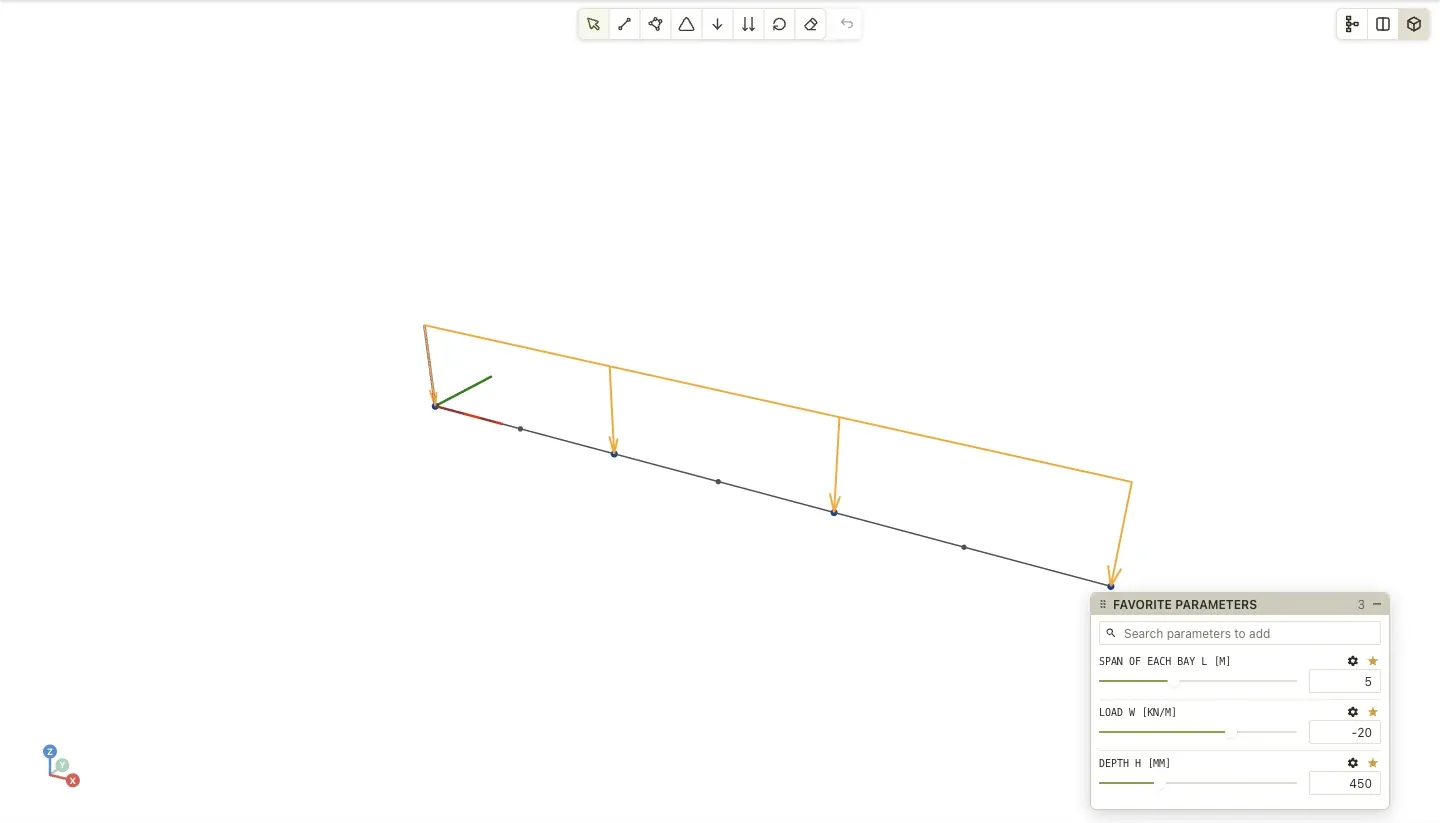
A single slider moves all four supports.
Since the coefficients don’t depend on the span, you can predict the result before solving: reactions grow with L and moments with L². With L = 10 m, the moment over the interior supports goes from −50 to −200 kN·m.
With these three parts you have what you need to model your own structures: parameters, geometry that depends on them, supports, loads, and results that check themselves every time you solve. The three models are under File > Samples whenever you want to come back to them.