Wire nodes
Connect input, math, structural, section and results nodes on a visual canvas, in the style of Grasshopper or Dynamo.
Open source · Runs in your browser
ParamEle is an open-source web tool for conventional structures such as reinforced-concrete frames. Wire nodes in a visual graph, review the 3D model, solve it in your browser and take it to SAP2000, ETABS or SkyCiv S3D.
01How it works
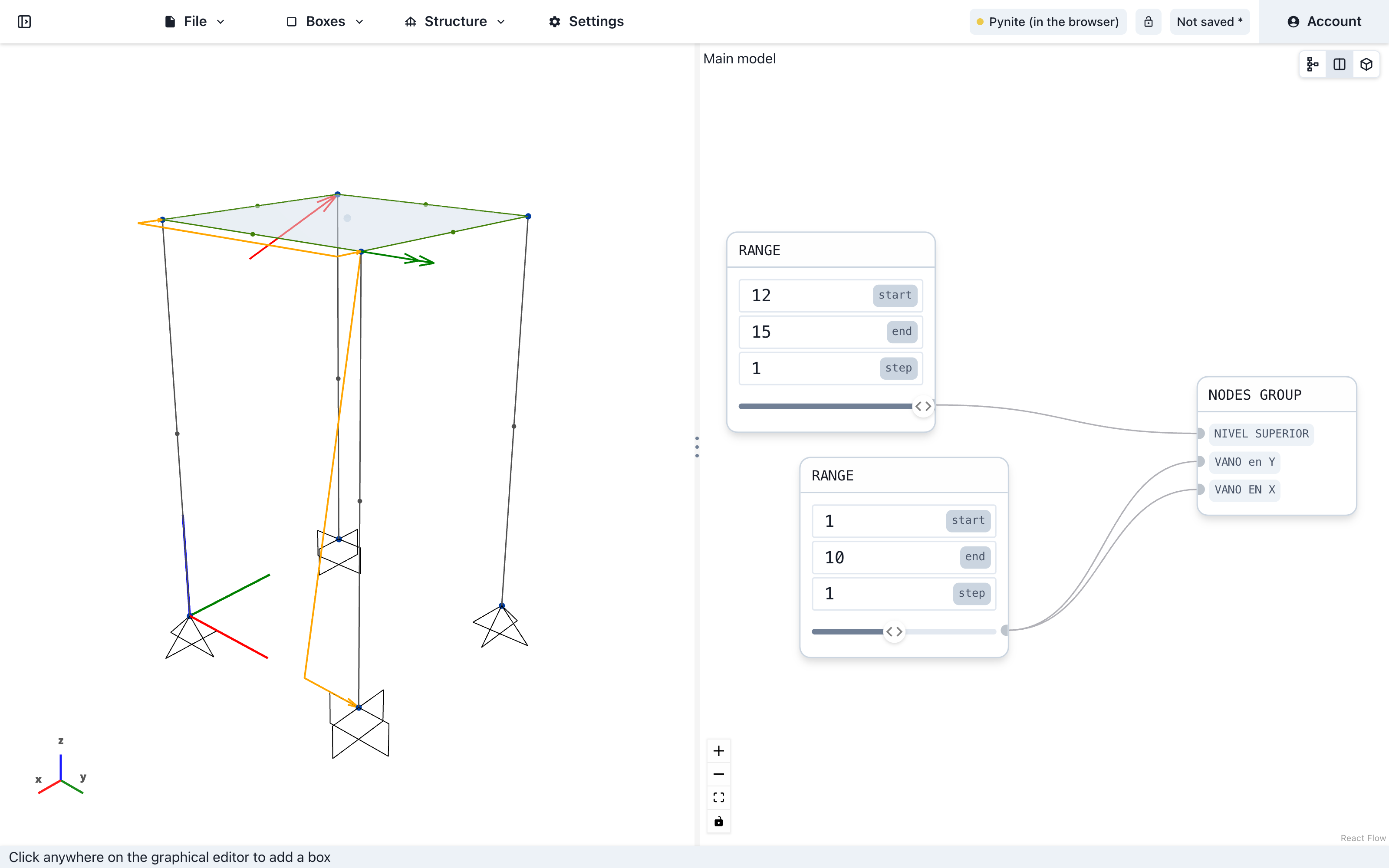
Every element of the model comes from a node. Change one input and everything downstream updates.
Connect input, math, structural, section and results nodes on a visual canvas, in the style of Grasshopper or Dynamo.
The graph is evaluated into nodes, members, plates, supports and loads, drawn live in an interactive 3D view.
Solve in your browser with PyNite or in the cloud with SkyCiv: reactions, member forces and displacements for each load combination.
Take the model to SAP2000, ETABS or CSiBridge as a CSI .$2k file, or open it in SkyCiv S3D, and keep working in the tools you already know.
02Parametric studies
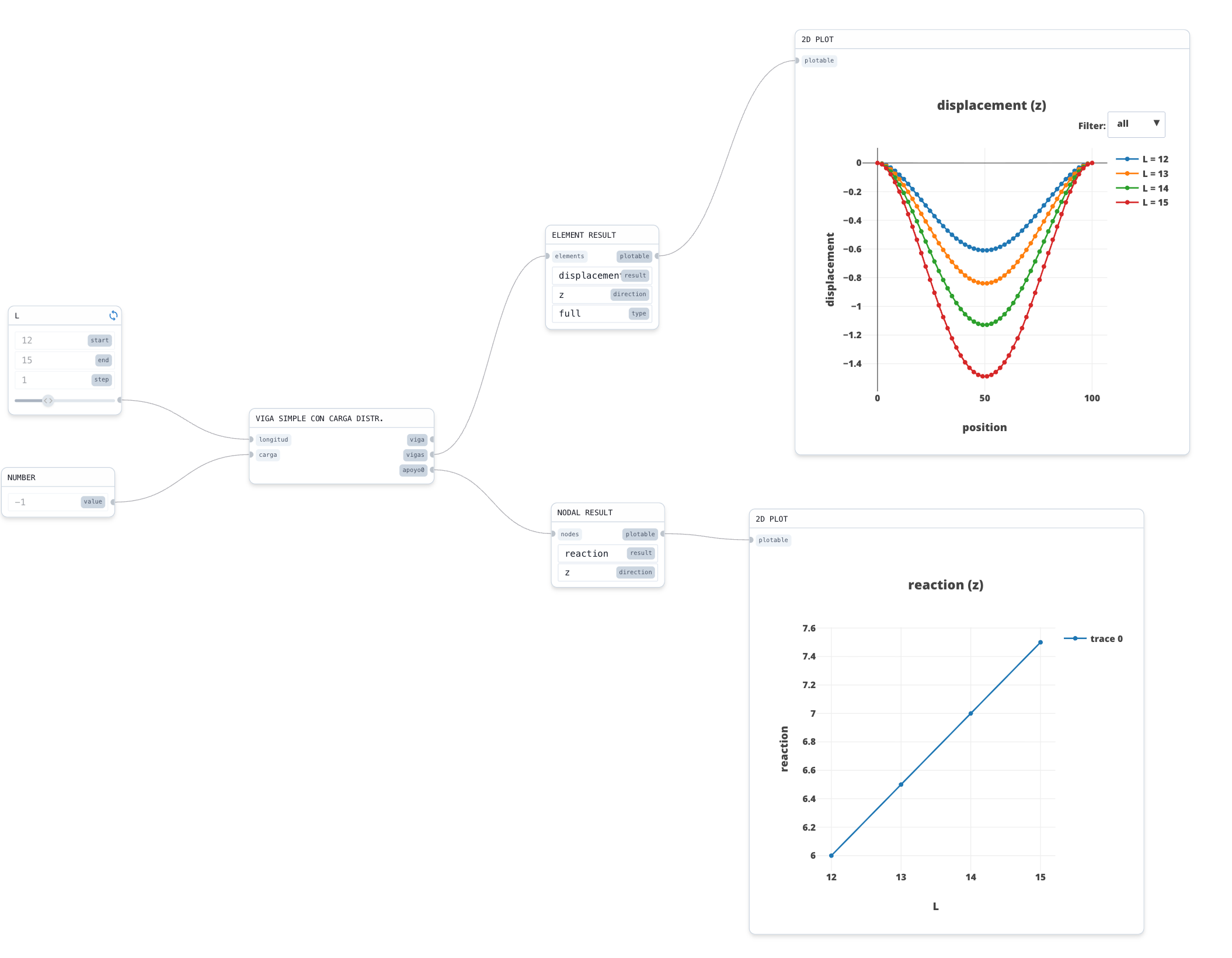
A slider node expands into every combination of its parameters. Each combination becomes its own model, solved and compared with the rest.
03Interoperability
Generate the model parametrically in ParamEle, then take it to CSI software or SkyCiv, where your office already does analysis and design.
Export the model as a CSI .$2k text file.
Bring models you already have in .$2k format into ParamEle.
Import S3D models into ParamEle, and open models solved with SkyCiv in SkyCiv S3D.
Draw in CAD and import the DXF: lines become members.
Round trip with SkyCiv
Choose SkyCiv as the solver engine: the model is solved in the cloud, saved to your SkyCiv account and opens directly in SkyCiv S3D, where you can review the results or carry on with the design.
Model in ParamEle
parametric graph → S3D model
Solve with SkyCiv
SkyCiv API · your account
Open in SkyCiv S3D
results · design
04Runs in your browser
ParamEle runs PyNite, an open-source Python finite-element library, inside your browser through Pyodide and WebAssembly. The analysis runs on your own machine, in a background Web Worker.
PyNite in the browserDefault
No server and no installation. This is the default.
PyNite on a local server
The same solver as a local Node and Express service.
SkyCiv in the cloud
Solve with your SkyCiv account. The model is saved to your account, ready to open in SkyCiv S3D.
Editor
graph → S3D model
Web Worker
background thread
Pyodide
Python on WebAssembly
PyNite
finite-element analysis
Workspace
Sign in and keep your models in the cloud.
Save versions with a message and go back to any of them.
Share a model and decide what each person can do.
The whole interface is available in both languages.
05Open source
Engineers should be able to check how their results are computed. ParamEle's source is public on GitHub, so you can see exactly how each model is built and solved.
osasanchezme/paramele / src/flow-nodes/basicStructural.js
9const node_target_ids = ["x-value", "y-value", "z-value"];⋯22function StructuralNodeExec(args) {23 let full_args = node_target_ids;24 let structural_args = utils.convertNodeToStructuralArgs(args, full_args);25 return {26 "node_out-id": {27 ...structural_args,28 },29 "node_list_out-ids": [],30 };31}06FAQ
Yes. ParamEle is open source and free to use in your browser. Solving with SkyCiv requires a SkyCiv account.
No. The app and its default solver run in a modern web browser. The local solver server is optional.
You can export to the CSI .$2k format, used by SAP2000, ETABS and CSiBridge, and open models solved with SkyCiv in SkyCiv S3D. You can import .$2k files, SkyCiv S3D models and DXF files; in DXF files, lines become members.
Choose SkyCiv as the solver engine and solve with your account. The model is saved to your SkyCiv account and opens directly in SkyCiv S3D, where you can review the results or carry on with the design.
Reactions, member forces and displacements for each load combination, computed with the PyNite finite-element library.
Conventional structures such as reinforced-concrete frames: nodes, members, plates, supports, and point loads, distributed loads and moments.
As with any analysis tool, a qualified engineer should review the model and verify the results before using them in a design.
The app and this site are available in Spanish and English.
Open ParamEle in your browser and start wiring nodes. There is nothing to install.